Spectranext 0.9 firmware update
Spectranext 0.9 is now available. This release makes the system more useful out of the box while opening it up to more existing Spectrum software.
esxDOS dot commands
Spectranext 0.9 adds support for a selected set of esxDOS-compatible dot commands. These familiar utilities run through a compatibility layer, while their filesystem operations continue to use Spectranext's VFS.
example showing paper command
The bundled commands are only a starting point: you can put your own compatible .dot programs in /bin and run them in the usual way. For the details of the memory layout, compatibility shim, and current boundaries, see esxDOS dot-command compatibility.
File Browser
The launcher now includes a File Browser (BOW Commander), the excellent dual-panel file manager by shrek128. It provides a practical way to browse and manage files directly on the Spectrum.
The browser operates in esxDOS environment, but because Spectranext now provides, it becomes possible.
If you prefer to use any other esxDOS browser, you can replace /sys/browser.tap on the device's filesystem.
The built-in browser and the Resource Index need an XFS filesystem mounted in slot 0, normally xfs://ram/. This is the default. If mount 0 points to another filesystem, switch it back to XFS before starting either tool.
Resource Index as a TAP application
The Resource Index has been reworked. It is no longer a fixed Spectranet module; it now lives as a TAP file that Spectranext launches. That gives it more room to grow and makes it easier to update independently of the old module-size limits.
As with the File Browser, the Index is launched from XFS, so mount 0 must be an XFS mount for it to work.
Upgraded overlayed filesystem
The overlayed XFS filesystem has been reworked to make the three kinds of files clearer in one directory tree:
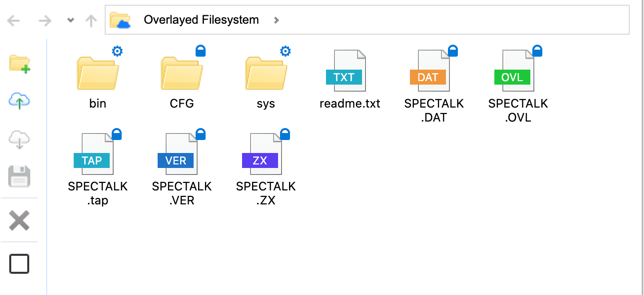
- System-provided files are marked with a gear.
- Files committed to flash are marked with a lock.
- Files in RAM are temporary and disappear when the device loses power.
This preserves the useful overlay model: bundled system tools, persistent files, and temporary working files are all available through the same paths, with each layer visible at a glance.
Overlayed filesystem requires a mount of xfs://ram/ in your configuration. All three filesystems work
under the same mount.
Better timing on Spectrum Next
Timing fixes improve reliability across supported machines, with particular benefit on the Spectrum Next.
Emulator support
For those interested to run it in an emulator, you can download latest version of FuseX here. If you already have it, just select Check for updates for the built-in auto-update functionality.
FuseX now builds on Linux!
Updating to 0.9
For most devices, simply power Spectranext on. It will check for and apply the update automatically.
There is one important Spectrum Next caveat: a bug in the OTA process can prevent the device from rebooting after the update, causing the update to be discarded. If that happens, visit ota.spectranext.net and recover the firmware manually.