Peer-to-peer connections and delivery updates
Two Spectrums can now connect directly over the internet, without a game server carrying the traffic between them.
I demonstrate that in the video with Shatranj, a multiplayer chess game which now has matchmaking built in.
Peer-to-peer chess
The other update is peer-to-peer connections. One Speccy can connect to another Speccy over the internet, even when both are behind home routers.
In Shatranj, you choose CREATE or JOIN, select MATCH for the link, and set the game parameters. MATCH is short for matchmaking. Spectranext takes care of establishing the connection, and the game uses its usual DIRECT protocol over the resulting stream.
Once it is established, the chess moves travel directly between the two machines. There is no game server in the middle forwarding them.
Thanks to Ignacio for adding this to Shatranj and testing it on both the cartridge and FuseX. Having a real application use the feature has been very useful for finding the parts that needed work.
A special address, and the usual socket calls
The API is extremely simple. A program resolves a special hostname, such as:
shatranj@match.spx
It then opens a socket and calls connect() as usual. Spectranext recognises
the special address and brings up its matchmaking menu. You select the other
machine, or wait for the other person to select yours.
The application waits while this happens. Once the connection is ready,
Spectranext restores the application's screen and connect() returns success.
The program can then send and receive data through that socket.
You do not need to write a peer list, exchange IP addresses, or explain port forwarding to the person who wants to play your game. The system does that work. Applications which want their own menu can also use the controller interface directly, as Shatranj does for its hosting screen.
It is not limited to games. A chat program, file exchange tool, or another application connecting two machines can use the same mechanism. Choose a service name for your application, and only compatible peers using that name and transport appear together.
You can host the program files over HTTPS as with any other Spectranext resource. Hosting the files and carrying the multiplayer traffic are separate jobs; you do not need to run your own matchmaking backend or game server.
The matchmaking documentation explains the socket calls. There is also a small peer-to-peer chat example in C. It works on physical Spectranext hardware with firmware 1.2 and in FuseX.
What happens underneath
The application interface is small, but there are a few steps behind it.
First, find the public address
A Spectrum on home Wi-Fi normally has a local IP address. Another machine somewhere on the internet cannot connect to that local address directly. The router translates outgoing traffic to its public address, a process called NAT, and keeps track of which machine and port the replies belong to.
Spectranext opens a UDP socket and sends a request to a STUN server. The server replies with the public IP address and UDP port it saw. Both devices advertise those endpoints through the matchmaking service, which exchanges them when the pair is selected.
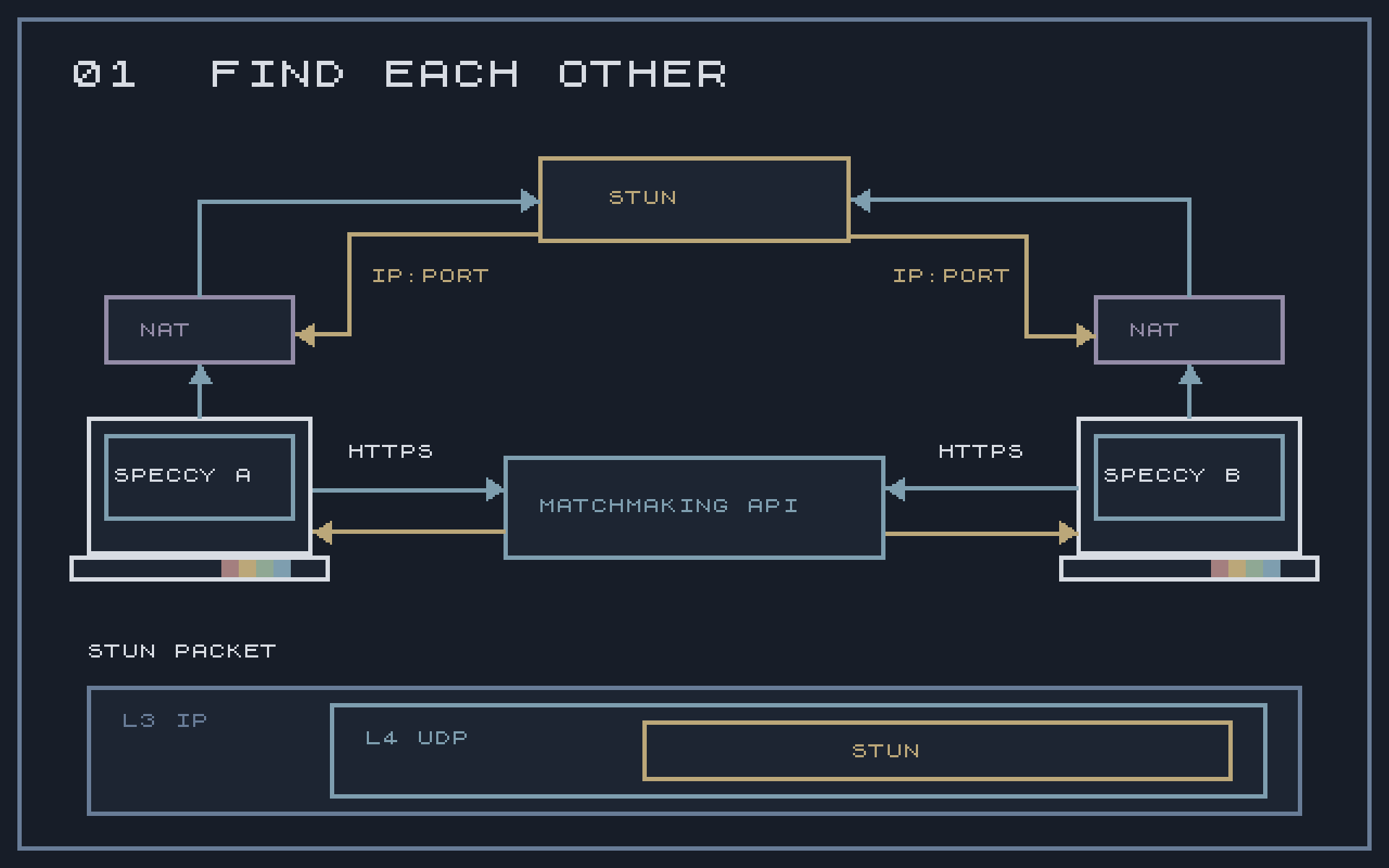
STUN does not open a port on the router. It tells us what address the router used for that request. The next step is to try reaching the other machine.
Then, UDP hole punching
Both machines send packets towards the other's public endpoint. Each router sees outgoing traffic and can create the state needed to let packets from that peer back in. The first packets may be dropped while the other side is still getting ready, so connection setup sends probes again for a limited time.
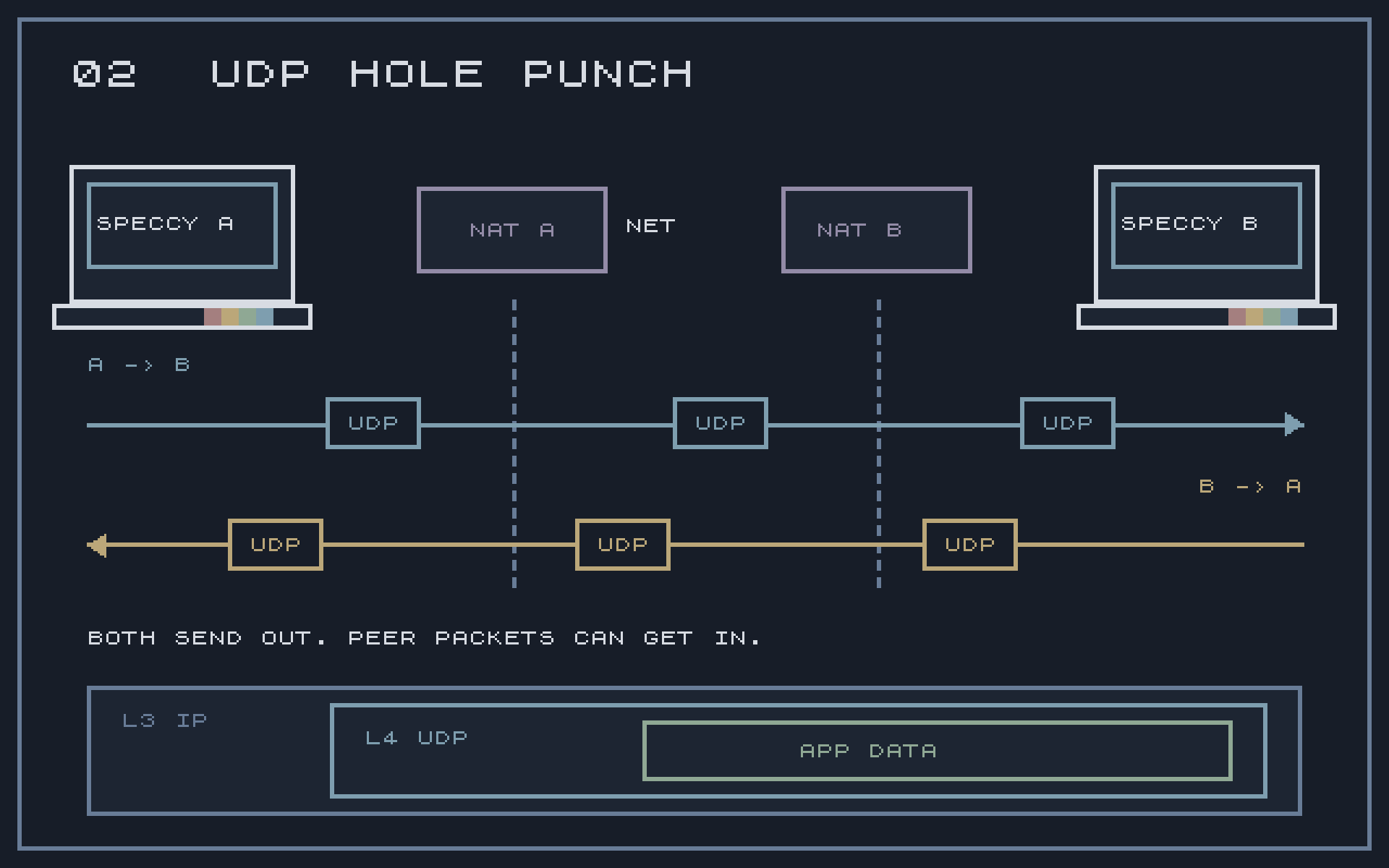
This is UDP hole punching. When it works, the two devices have a direct path without anyone changing their router settings. The matchmaking and STUN services do not carry the application data.
What about TCP?
An application may want a reliable byte stream, as the chess game does. UDP hole punching gives us a UDP path, so Spectranext carries TCP through that path inside a tunnel.
From the application outwards, the layers are TCP, inner IP, GRE, UDP, and the outer IP packet sent across the internet. GRE is the wrapper used to carry the inner IP packets.
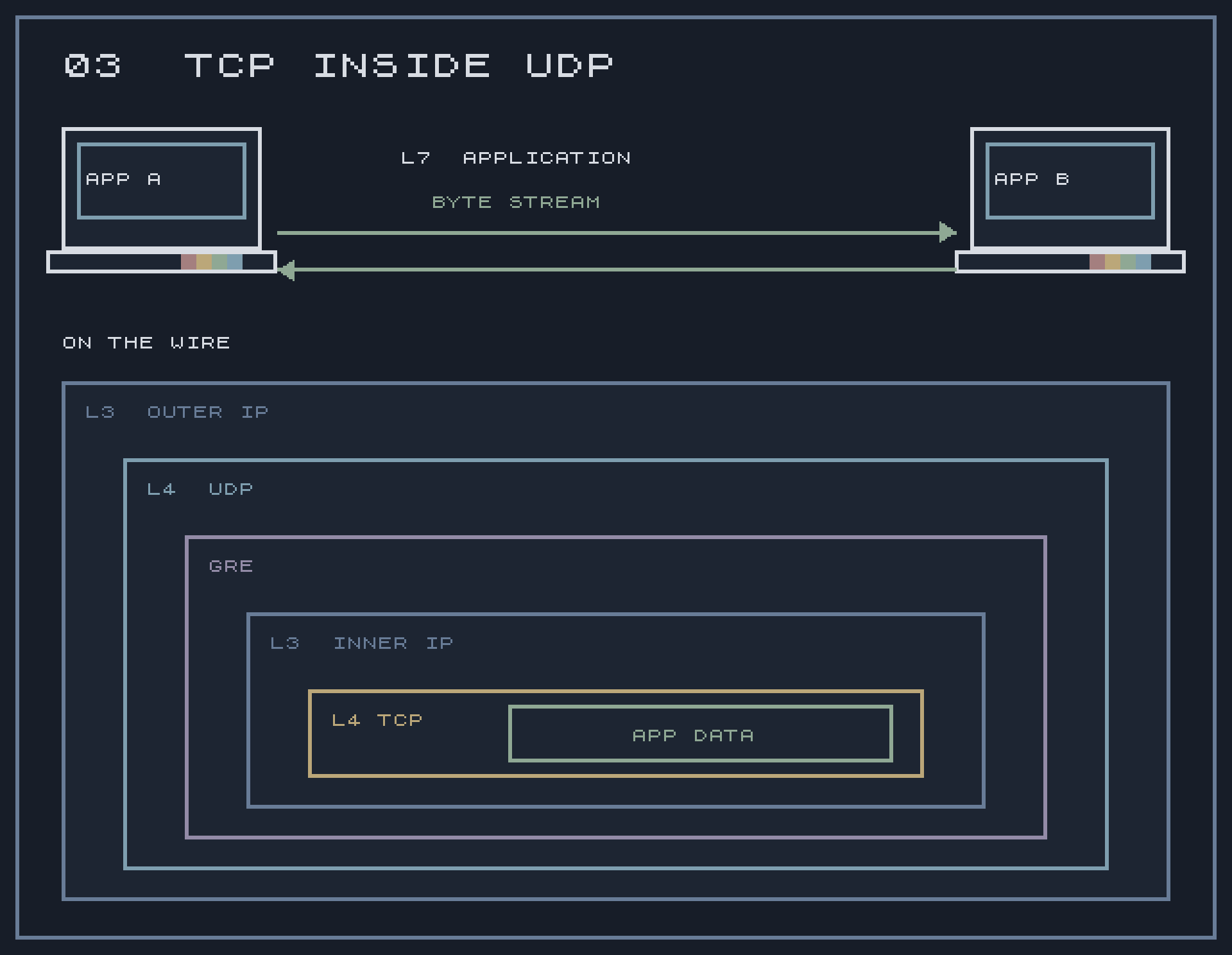
TCP still handles acknowledgements, retransmissions, ordering and flow control. The application continues using its normal stream protocol. Both matched endpoints understand the tunnel; this is not a plain TCP connection that an ordinary public TCP server could accept.
Both applications still call connect(). Spectranext assigns the internal
TCP connection roles. The application can agree on its own roles, such as
which player hosts the game, after connecting.
For an application using UDP, the inner TCP/IP/GRE layers are not needed. It exchanges datagrams over the direct UDP path and handles any reliability it needs itself.
Trying it yourself
Some routers and firewalls prevent a direct UDP connection. There is currently no relay fallback, so those connections can fail even if both machines appear in the peer list.
Two machines sharing one public IP address can also have trouble if the router does not support sending traffic back inside its own network, known as NAT hairpinning. For a test, put one machine on a phone hotspot or one PC on a VPN which permits UDP traffic. That gives the pair different public endpoints, although the network still needs to allow the direct connection.
The connection setup article has more detail if you want to see the full sequence.
A small manufacturing technique
Everyone who makes cartridges for the Speccy has to deal with the edge connector. Cutting the corners is just one step of very many, but getting it repeatable took me a few attempts.
I made a custom jig to hold the board and use a reciprocating saw with a 0.6 mm blade. It gives me repeatable cuts with a good finish, and takes about 30 seconds per board.
Before that, I tried a Japanese saw with a 0.5 mm blade. The cut itself was fine, but I could not make it repeatable enough. I know some people use CNC machines, which are very repeatable, but those are expensive tools and I simply do not have room for one. So I wanted to share this small technique for anyone doing similar work.
You can observe that on the video above.